
Delete files that had been removed from Recycled Bin

Well I also something make mistake by deleting files directly from the system, I like use the shift key which will remove the files from the system without going into recycled bin.

Well this is a lesson that I guess quite a lot of people had been through, And also i had a few customer who call me in to recover their deleted files as well. This is the trick that i use to do is first get a USB or Portable hard drive, download the program RECUVA from Piriform website. If you are not technically good enough, you could get the Recuva professional which has Technical Support included. And can get them to assist you in getting your files back. But if you are ok with software you can do it yourself.

First make sure you do not use the system any more first as you might write data to those deleted files location which later might cause your files to be unrecoverable. Plug the USB stick or USB drive and install the software into the USB stick or USB drive and run the program from there, in this case you will not over write the deleted files. Select the file type if you know what you are recovering. If you are not sure just select the Other which show all files. Select your location next if you are not sure then select “I’m not sure” to search everywhere on this computer. Enable Deep scan after the first scan which fails to file your files. The software will scan and give you are list of your files that you have deleted. And you can select it and recover to a new location, This is where the USB stick or USB drive come in handy, You should try recover to the USB stick or USB drive location so as not to overwrite the your hard drive.

That is the tricks. Hope that work for you.

Regards
Hickural
Remote access from outside to Local PC

There are a few ways to remote access from outside PC or system back to home. The easily way to go is to setup Teamviewer at your home PC. Make your PC don’t sleep forever. Then when you are outside you can use tablet or smartphone with teamviewer software and key in your ID and password to access back to your PC.

The other way which is more completed is to open up RDP and setup a PC either XP or Vista or Windows 7 (Min requirement has to be Professional and above), fix an IP address to the PC and configure your router to open up 3389 PORT and do a map back to the PC.
Example if you have a PC with IP address 192.168.100.55 you can set your router to do a port forwarding from external network any access to 3389 (the RDP port) transfer the information to IP address 192.168.100.55
The only one problem is if you are using dynamic IP address you might need to register a Dynamic DNS services which will allow the registered host name at dynamic services to point back to your router.
You should be able to google around for a free Dynamic services or click on this link and configure it up to use the services to point back to your router and access your pc.

Regards

Hickural

IE and firefox toolbar

Visited one customer, saying that his IE and FireFox are very slow when open, fire up the IE, I was suprise to see so many toolbar install in IE as addons, that is one of the reason why the system goes so slow. Suggest to him to keep just the toolbar he need. Basically Only Google toolbar he wanted. Thus i help him to uninstall the mediabar, inbox bar, utility chest bar, Bearshare toolbar, imesh mediabar, referenceboss toolbar, windows live toolbar and left the Trendmicro Toolbar intact.

Same goes for the firefox when he had a lot of toolbar, he actually think that these are necessary for the system to function properly.

Well there is a better way if you just wanted to reset the IE (Internet Explorer) to default, You can actually goes to Tools -> Internet Option -> Advanced -> Reset

It will reset your Internet explorer into default setting where by all your toolbar will be gone and is just like a fresh installation of the Internet Explorer. But to bear in mind that all your customize setting is also gone. So if you have a special startup page you might wanted to copy it and paste back after you have reset the Internet Explorer.

Regards

Hickural

Simple Internet Troubleshooting

I was with one customer regarding his internet not working. Well maybe I can write out a simple troubleshooting guide that I use to troubleshoot the Internet issue.

First of all make sure all the physical connection like cables are connected properly from PC to router/modem or switch. This is important as I had case where they said is Internet not working turn out that the network cable behind the PC got drop out. So physically check the network connection is important.

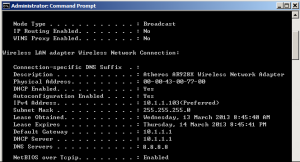
Next try to determine your own ip address, the way I is to open up a command promt and key in “ipconfig /all” which will show quite a lot of information on your system. Like this screen below
ipconfig-all

It tell you that your own IP address is 10.1.1.103 and the gateway is 10.1.1.1
From here, we can try to do a ping on your own IP address to make sure that you can ping via
 ping 10.1.1.103
if the result show reply from 10.1.1.130: xxxx xxxx xxxx
that means that we are communicating with ourself then next we can further verified if we can talk to the gateway which is also the router via

ping 10.1.1.1
if the result show reply from 10.1.1.1: xxxx xxxx xxxx

that means that we know that we can talk to the router. Then we can try pinging further like 8.8.8.8 which is the Google DNS server via

ping 8.8.8.8

if the result show reply from 8.8.8.8: xxxx xxxx xxxx

then we should be able to connect to the internet.

If result show time out or destination host unreachable. We then can conclude we have problem it some stages depend on which ping stages fail. We can isolate out the problem and concentrate on what cause it and solve it. Being network card fail or cable  has problem or router faulty all are easily determine via a simple ping test.

Regards
Hickural

How to know if is a scam or spam mail

Got one of my customer who ask me this question, how do we know if this mail is a fake mail or spam mail etc. Simple first look at the sender to see if is someone you know. Then examine his email to see if is tally with the secender.

Example if the sender is from john smith and the email address is 06alpha21@xxxx.com then this look suspecting. you can then send a real message to John Smith and check with him that did he send you this mail with the following content etc.

Another case will be if is coming from a courier services check also the email address as it could be something else. or make a phone call to the courier service to enquire regarding this parcel etc.

There is one case that your friend mail could be hack and sending from him to you. but those mail could easily find with fault if you look at the detail.

I had a mail from “paypal” saying that i had make purchase to a site of 149.99 dollars and the mail look real, after a few detail examine on the mail i realize that the problem is that email account that “paypel” send me was wrong and i never use that mail to register with paypel.

So a if you are careful before you click the mail it could save you from getting a tech to come and help.

Regards
Hickural